Airbnb checkout instructions: free template and message for guests
Airbnb checkout instructions: what to ask guests, what Airbnb says not to ask, the evening-before message and late checkout. Free Word and PDF template, plus signs.
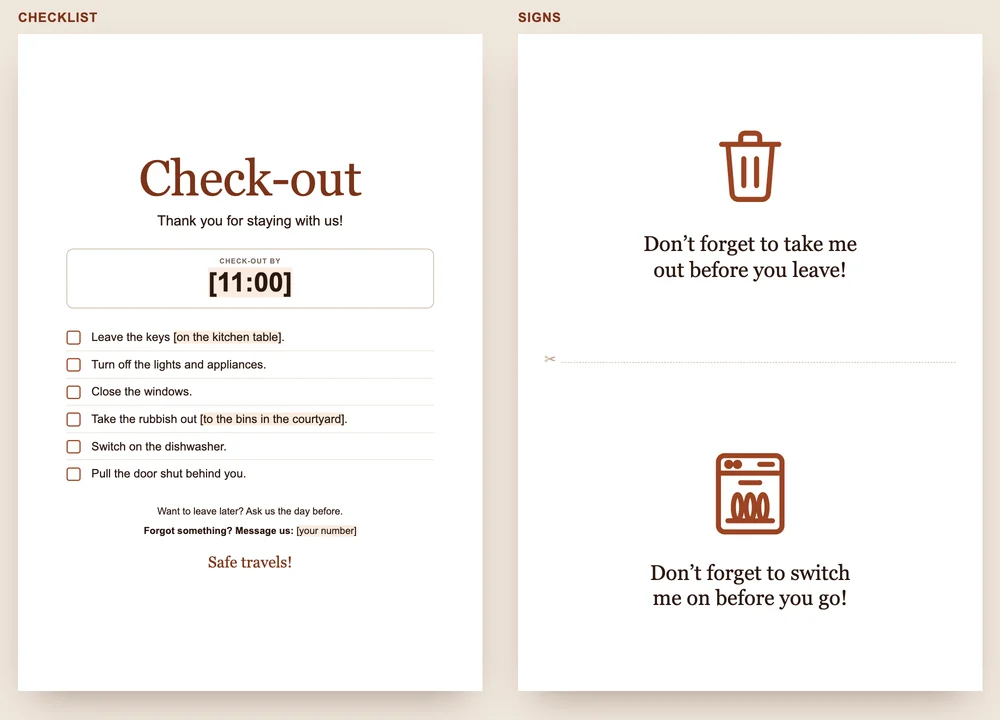
Good Airbnb checkout instructions fit on one page: the checkout time, where the keys go, lights and windows, rubbish, the dishwasher, the door. The template has these points, plus two signs for the bin and the dishwasher.
What to put in your checkout instructions
- The checkout time, big and at the top: “Check-out by 11:00”.
- Where the keys go: on the kitchen table, in the key box, through the letterbox. One place, not two.
- Turn off the lights and appliances.
- Close the windows.
- Where the rubbish goes, and which bin is for what. Recycling rules change from council to council, and visitors don’t know yours.
- Switch on the dishwasher and pull the door shut.
In Word, you change the sand-coloured fields: the time, where the keys go, the way to the bins, your number. Rules for the whole stay, such as smoking or quiet hours, belong in your house rules, not on this sheet.
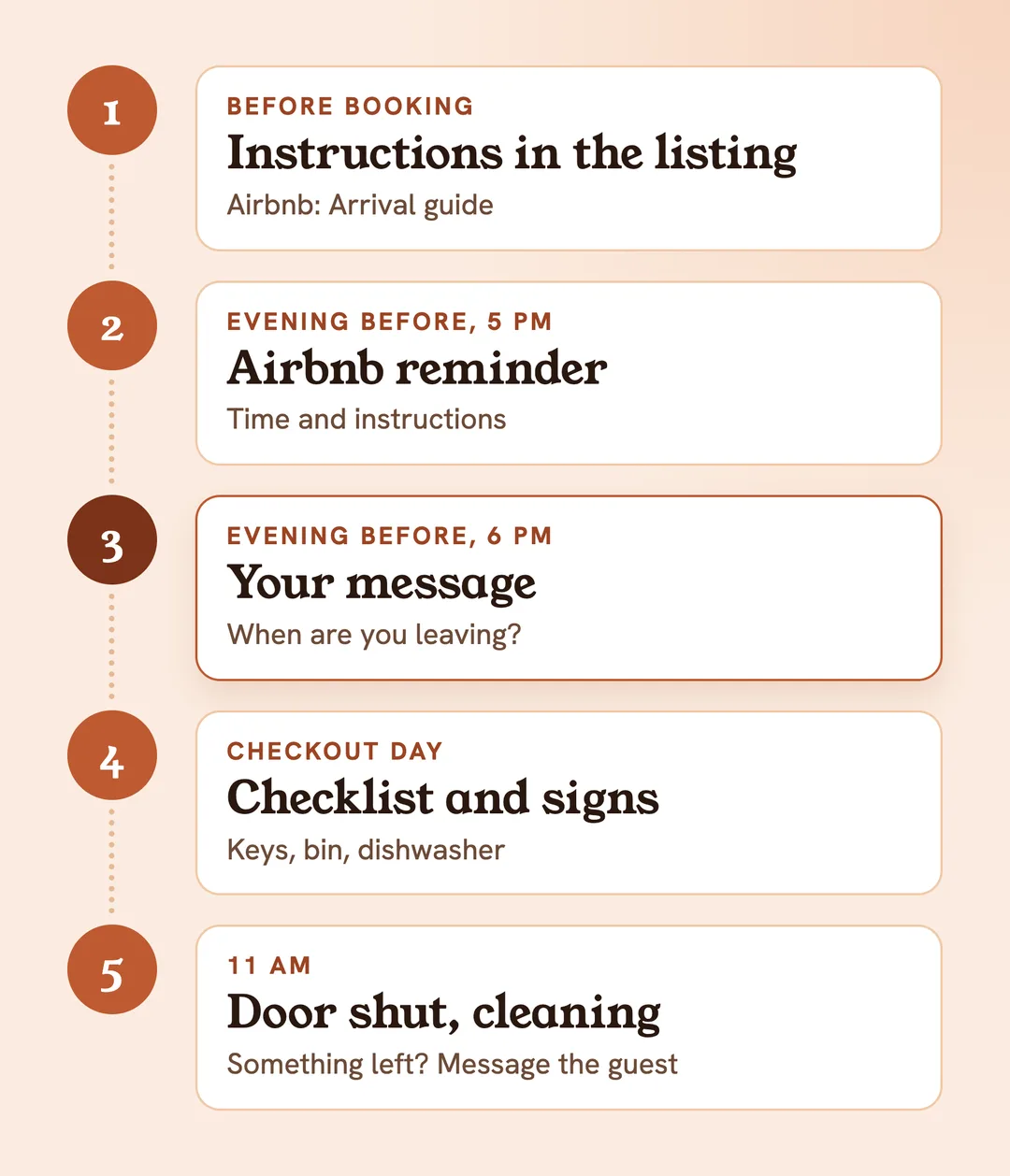
From our experience, you can ask for almost nothing. At around 6 pm the evening before checkout, an automatic message goes out on Airbnb and Booking.com: thanks, a rough departure time, leave the keys in the flat, lights off, windows closed, pull the door shut. Rubbish and the dishwasher aren’t in it. Instead, two small, funny signs do the job: on the bin, “Don’t forget to take me out before you leave!”; on the dishwasher, “Don’t forget to switch me on before you go!”. Both are on page two of the template.
What not to ask guests
Airbnb guests expect a checkout without cleaning. The ground rules for home guests only ask them not to leave the place in a state that needs excessive or deep cleaning. Cleaning fees cover standard cleaning between reservations, and hosts may not charge fees if guests skip specific cleaning or checkout tasks.
After the stay, guests can mark “excessive checkout tasks”. Listings with repeated low ratings for unreasonable tasks may be removed from Airbnb (Airbnb Resource Centre).
So strike anything that sounds like cleaning: stripping the beds, mopping floors, wiping out the fridge. The only request of this kind that Airbnb suggests itself is “Gather used towels”.
How to add checkout instructions on Airbnb and Booking.com
On Airbnb, the instructions go into the listing (Airbnb Help):
- Go to “Listings” and pick the property.
- Under “Listing editor”, open “Arrival guide”.
- Select “Checkout instructions”, then “Add instructions”.
- Choose your points and press “Save”.
The options are “Return keys”, “Lock up”, “Turn things off”, “Throw trash away”, “Gather used towels” and “Additional requests”, each with up to 140 characters of detail. Guests see the instructions before they book. At 5 pm local time the day before checkout, the Airbnb app reminds them of the time and the instructions, if notifications are on. After leaving, they confirm with one tap that they’ve gone.
On Booking.com, create a message template in the extranet’s messaging preferences and schedule it for one day before departure (Booking.com Partner Hub). Save other language versions under the same template name, and each guest gets their own language.
The evening-before message, ready to copy
Send it the evening before checkout, while guests are packing. Asking for the departure time pays off twice: you can plan the cleaning, and you know when the place is empty. Some of our guests write “We’ve left, thank you!”, others say nothing. Then we only find out when we walk in ourselves.
“Hi [name], thank you for staying with us! It would help us a lot to know roughly when you’re leaving tomorrow, so we can plan the cleaning. Check-out is by [11:00]. Please leave the keys [on the kitchen table], turn off the lights, close the windows and pull the door shut behind you. Safe travels!”
Late checkout: when to say yes
The request usually comes the evening before, as a reply to that message. Decide by the calendar:
- If new guests arrive the same day, the cleaning needs its slot. Ours is checkout by 11, cleaning straight after, the next guests from 3 pm. Then 11 stays 11.
- If the next guests only arrive in the evening, we extend to 1 pm at no charge. Guests we do this for often come back.
Put the new time in your reply, so it stays in the chat: “Of course, you can stay until 1 pm. Just drop us a line when you leave.”
Forgotten items and open doors
Guests forget things all the time. A family once left their child’s medicine behind: we messaged them, and they came back for it. Some guests ask us to post things at their own cost, others tell us to throw them away. So ask: send it back or bin it? On Airbnb, the guest can pay you the postage through the platform (Airbnb Help). Under the ground rules, guests may leave luggage after checkout only with your approval.
Once a guest left the front door of the flat open. Because our cleaning starts at 11, it wasn’t open for long. The door belongs on the list, even if it sounds obvious.
Overseas guests: the register before departure
The Immigration (Hotel Records) Order 1972 asks anyone who provides lodging for reward to keep a record of guests aged 16 and over, and checkout is the last moment to complete it: before they leave, overseas guests should tell you their next destination, with the address if they know it. You keep each entry for 12 months. Who counts as overseas, and what else goes in the book, is in our guest register template.
A paper sheet or a digital welcome book?
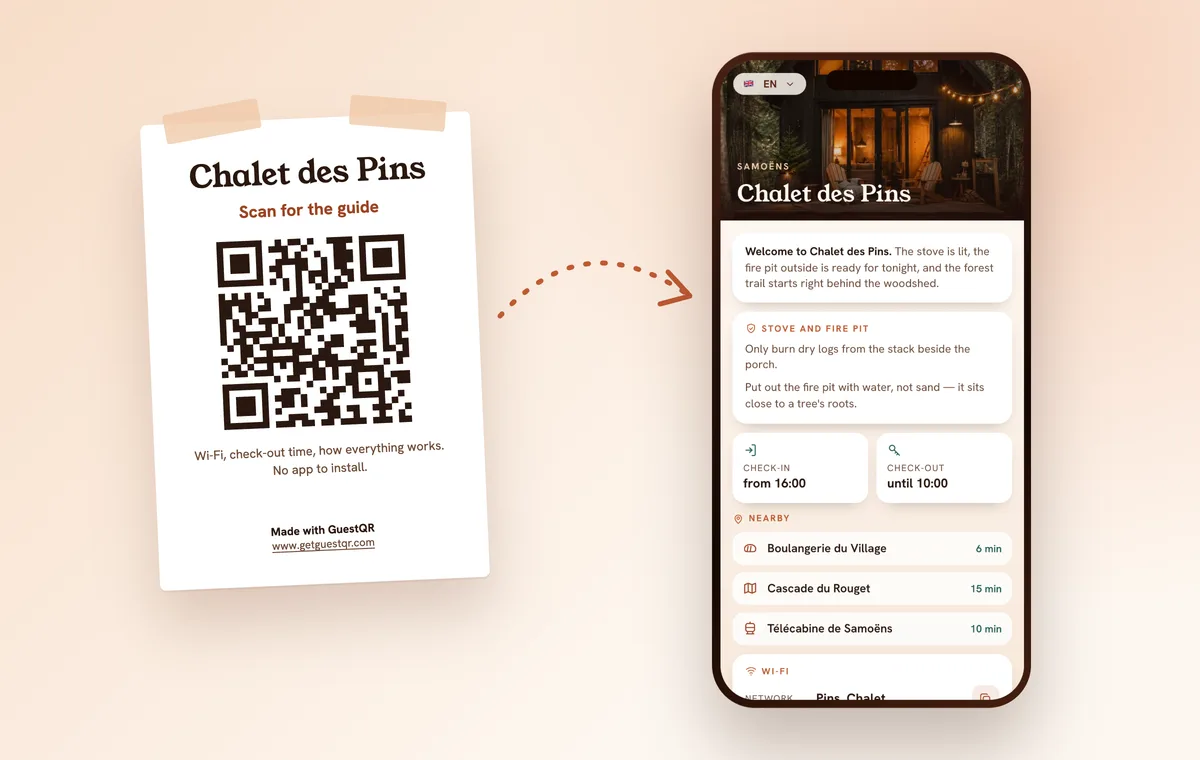
Guests read a paper sheet on the day they leave, with their bags already packed. It’s better if they know the checkout routine sooner. With GuestQR, it lives in your digital welcome book, which guests open before they even arrive: the checkout time next to the check-in time, and below it the “Before you leave” card with your text, up to five photos and a video, say of the way to the bins. Guests read it in their own language, one of eight, without an app. In the property, the QR poster on the wall opens the same guide, and you add the link to the evening-before message. On Booking.com, approve the link in the messaging security settings first.