Airbnb welcome book template: free Word download and examples
What to put in your Airbnb or holiday let welcome book: 10 sections, example wording to copy and a free, editable Word template – no sign-up needed.
A good welcome book answers your guests’ questions before they message you: the Wi-Fi, the keys, which bin is which, what time to check out. Here’s what to include, example wording to copy and a free Word template you can edit – no sign-up needed.
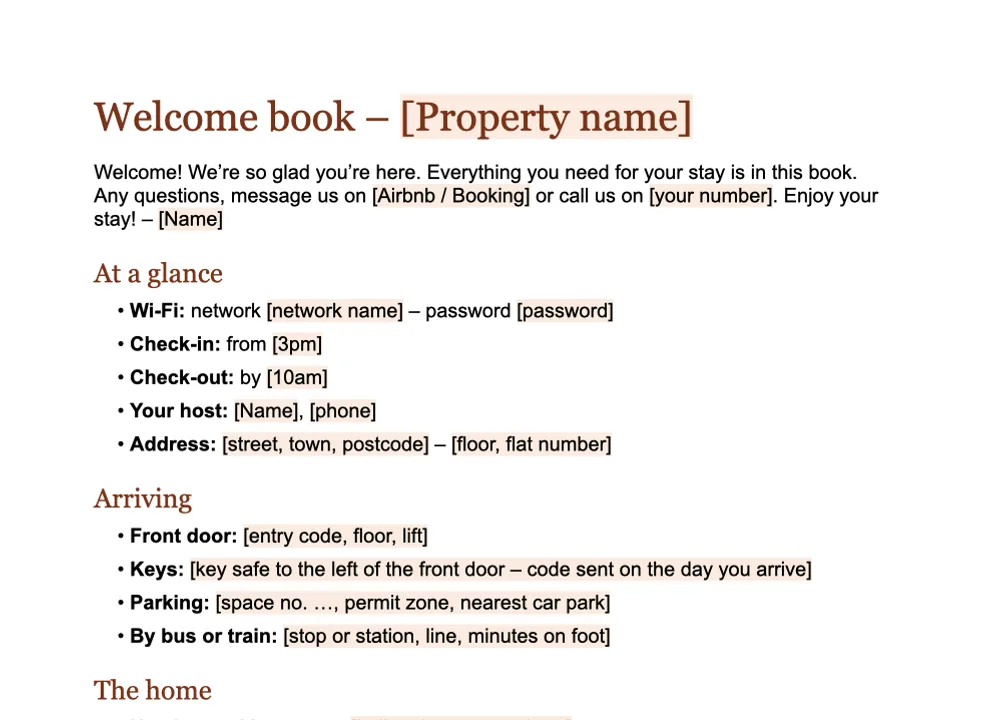
Download the welcome book template (Word, free)
What should you put in an Airbnb welcome book?
Follow the order of the stay: arrive, settle in, enjoy, leave. Ten sections work as well for a city flat as for a seaside cottage.
- A welcome note. Two or three sentences, your first name and how to reach you.
- Arrival. Full address and postcode, floor, key safe, parking and permit zones, check-in time.
- Wi-Fi. Network name and password, on the first page, in large type.
- The home. Heating and hot water, hob, oven, washing machine, TV: one line per appliance, where guests get stuck most often.
- House rules. Smoking, quiet hours, parties, pets, number of guests.
- Bins and recycling. Which bin takes what, and which day is bin day. Every council does it differently, so visitors won’t know.
- Fire safety. Where the smoke alarms, fire blanket and extinguisher are, and the way out.
- Checking out. Time, where the keys go, what to do before leaving – and what not to bother with.
- Emergencies. 999 or 112, NHS 111, the nearest pharmacy and A&E, your number.
- Local tips. Café, pub, walks, a rainy-day plan, supermarket hours – your genuine favourites, with walking times.
For the Wi-Fi there’s a shortcut: with a QR code, guests don’t have to type the password. Create one for free here and print it next to the router.
Example wording to copy
Write the way you’d talk to guests in person: warm and brief. Four blocks you can use as they are.
Welcome. ‘Welcome! We’re so glad you’re here. Everything you need for your stay is in this book. Any questions, message me on Airbnb or call me on [your number]. Enjoy your stay! – Emma’
Self check-in. ‘The flat is on the second floor, first on the right. The key safe is to the left of the front door; I’ll send you the code on the day you arrive. Check-in is from 3pm.’
Bins. ‘The bins are by the side gate. Blue bin: paper, cans and plastic bottles. Food caddy: food waste. Black bin: everything else. Collection is on Tuesday – please put the bins out on Monday evening.’
Checking out. ‘Please check out by 10am. Pop the keys back in the key safe, close the windows and start the dishwasher if it’s full. No need to strip the beds.’
Bin colours vary from council to council – use yours.
Is a welcome book a legal requirement?
Not as such. But it’s the natural home for things the rules do ask of you:
- Fire safety information. In England, the government’s fire safety guide for small holiday lets says to include details of the escape route and exit doors in the information you give guests (gov.uk). The same guide reminds you that a fire risk assessment is a legal duty, and that you must keep a record of it.
- A licence in Scotland. You must get a short-term let licence before you take bookings or receive guests (mygov.scot). Adding the licence number to your book costs nothing.
The Word template has a fire safety section ready to fill in.
Paper or digital welcome book?
A printed welcome book has its charms: guests leaf through it on the sofa, and it never needs charging. But it dates quickly. A new code, a pub that’s closed, a change to bin day – and it’s time to reprint. It also speaks only English, even when your guests come from Germany, Spain or Poland.
A digital welcome book lives on your guests’ phones, they can read it before they arrive, and you can update it in a minute. That’s what GuestQR does: paste the link to your Airbnb or Booking listing, finish the guide and print a QR poster for the wall. Guests scan the code and read the welcome book in their own language – one of eight, no app needed.
You can do both: print the Word template and stick the digital book’s QR code on the first page.
Common mistakes
- Too long. Nobody reads twenty pages. Two to four is plenty – the rest belongs in your messages.
- Wi-Fi on page 6. It’s the first thing guests look for, so put it at the top of page one.
- Out of date. Check the book after every change and before each season.
- English only. If you host guests from abroad, a second language goes a long way.
- No bin day. Without it, the bins stay full until your next changeover.